

Catalogue ads are the most flattering campaign in most ecommerce Meta accounts. That’s not the same as being the most valuable one.
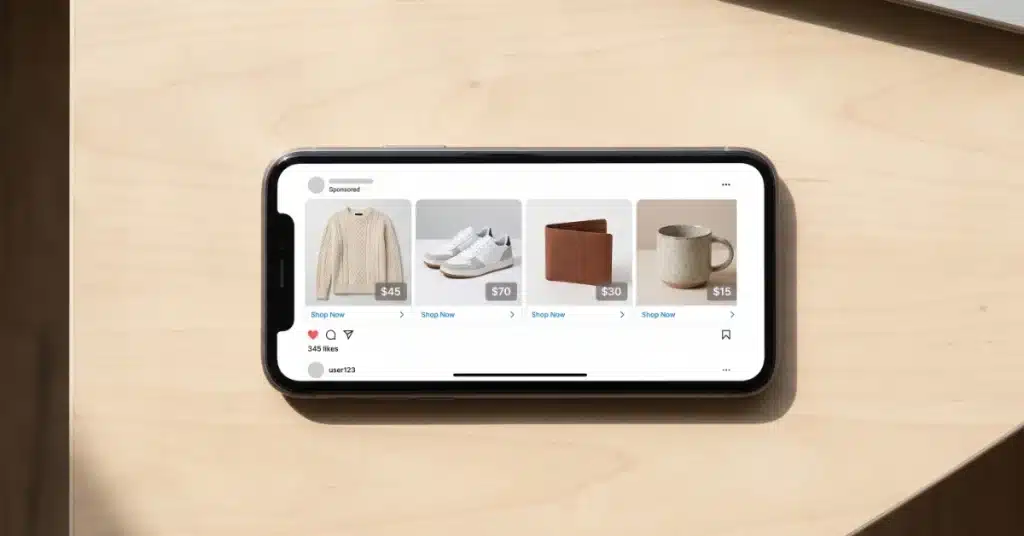
Meta catalogue ads (officially Advantage+ catalogue ads, formerly dynamic product ads or DPA) pull products straight from your product feed and show each person the items they’re most likely to buy, based on what they’ve viewed, added to cart or bought. They do two jobs. Retargeting shows people the exact products they already looked at, which is why it usually posts the best ROAS in the account. Prospecting, run with broad audiences, lets Meta match products to people who’ve never visited. Both run on the same thing: your catalogue. Which means your product images and titles aren’t supporting the ad. They are the ad.
Here’s how they work, what breaks them, and the trap that makes retargeting look better than it is.
Are catalogue ads the same as dynamic product ads?
Yes. Same format, three names. Meta launched Dynamic Product Ads in 2015, shortened it to Dynamic Ads the following year, then folded it into the Advantage+ family as Advantage+ catalogue ads in 2022. Most practitioners still say DPA out of habit. If a guide, a freelancer or your Ads Manager uses any of those names, they’re talking about the same thing: ads built automatically from your product catalogue rather than one at a time.
One naming trap worth knowing. Catalogue ads are an ad format, not a campaign type. You can run them inside a sales campaign aimed at retargeting, inside one aimed at broad prospecting, or inside Meta’s Advantage+ Sales campaigns (the renamed Advantage+ Shopping). Same product-powered ads, different jobs depending on where you put them.
How do catalogue ads actually work?
Three pieces have to be connected, and the ad is only as good as the weakest one:
- The catalogue. Your products, prices, images, titles and stock levels, synced into Meta Commerce Manager. On Shopify, the Facebook & Instagram app keeps this updated automatically.
- The pixel and Conversions API. These report which products each person viewed, carted and bought, using matching product IDs. If the IDs in your pixel events don’t match the IDs in your catalogue, Meta can’t connect behaviour to products and your retargeting quietly shows the wrong items. Full setup is in our Facebook ads for Shopify guide.
- The ad template. You design one template (carousel, collection, single image or video) and Meta fills it with products for each viewer. You’re not writing an ad per product. You’re writing one frame and letting the catalogue populate it.
Get those three talking to each other and the system handles the rest: which products, which person, which placement.
Retargeting vs prospecting: which job are your catalogue ads doing?
This is the bit most accounts get muddled, and it changes how you should judge the results.
Retargeting shows people products they already viewed or added to cart. It’s cheap, it converts well, and it usually posts the highest ROAS in the account. Useful, and worth running.
Prospecting (Meta called this dynamic ads for broad audiences, or DABA, when it launched in 2017) shows products to people who’ve never been to your store, matched on Meta’s read of what they’re likely to want. Harder job, lower ROAS on paper, and the part that actually grows the customer base.
Most small accounts run only the first and wonder why growth stalls. Retargeting can only recycle the traffic something else already created. Once your prospecting dries up, your retargeting pool shrinks with it, and that lovely ROAS starts shrinking too.

Why does catalogue retargeting ROAS look so good?
Partly because it’s good. Partly because it’s getting credit for sales that were already on their way.
Think about who’s in a cart-abandoner audience. Some of them left because they got distracted and would never have come back. Some of them were always going to come back and buy tonight after dinner. A retargeting ad shown to the second group gets full credit for a purchase it didn’t cause. Meta’s attribution can’t tell those two people apart, so the report blends them into one very flattering number.
That doesn’t make retargeting worthless. It makes it easy to over-fund. The practical guardrails:
- Exclude recent purchasers. Showing someone the product they bought yesterday is the fastest way to waste money and annoy a customer at the same time. Exclude purchasers for at least your typical repurchase window.
- Watch frequency. Small retargeting pools get hammered. If the same person is seeing your products eight times a week, you’re paying for irritation, not persuasion.
- Keep the budget proportionate. Retargeting should be a small slice of Meta spend, with prospecting carrying most of the weight. If retargeting is eating half your budget, you’re mostly paying to chase people who’d already found you.
- Test it properly if the numbers are big. A holdout test (switch retargeting off for a slice of your audience and compare) is the only way to know how much of that ROAS is real. Most agencies won’t suggest it, because retargeting is the campaign that makes their reports look best.
Your product feed is the creative
With a normal Meta ad, you choose the image. With catalogue ads, your feed chooses it. That shift catches a lot of stores out.
The white-background packshot that works perfectly on a product page is often the weakest possible ad in a social feed. It’s small, it’s flat, and it looks like every other store’s white-background packshot scrolling past. Meanwhile, a vague product title that nobody notices on your site becomes the headline under every ad.
The fixes, in the order they usually pay off:
- Use lifestyle or in-use images where you have them. Meta lets you add extra images per product in the catalogue. A product shown in use stops the scroll far better than a product floating on white.
- Add catalogue overlays. Price, a small frame or a discount tag layered on the product image through Meta’s catalogue ad settings. Cheap to set up, and it makes generic images look like ads rather than stock photos.
- Clean up product titles. Lead with what the product is. “Merino Crew Neck Jumper Navy” beats “The Hudson” when it’s sitting under an image in someone’s feed.
- Keep price and stock accurate. Showing sold-out products, or a price that doesn’t match the site, burns clicks and trust. If your catalogue isn’t syncing frequently, fix that before scaling anything.
- Mix in manual creative. Catalogue ads work best alongside strong, human-made creative, not instead of it. Video and UGC do the introducing. Catalogue ads do the reminding.
How do you set up catalogue ads for a Shopify store?
The short version, assuming your pixel and Conversions API are already sending clean data:
- 1. Connect your catalogue. Install or open the Facebook & Instagram app in Shopify and confirm your products are syncing into Commerce Manager. Check a few items by hand: images, prices, stock and links.
- 2. Check your event matching. In Commerce Manager, confirm your pixel events are matching to catalogue items. Poor match rates mean retargeting shows the wrong products.
- 3. Build product sets. Group products by margin, price point or category so you control what gets promoted. There’s no rule saying your lowest-margin line has to get equal airtime.
- 4. Create the campaign. In Ads Manager, choose the Sales objective, turn on the catalogue option, and pick your catalogue and product set.
- 5. Choose the job. Retargeting audience (viewed or carted, excluding purchasers) or broad audience for prospecting. Don’t mix both jobs in one ad set, or you won’t be able to tell which one is working.
- 6. Build the template and let it learn. Carousel is a sensible starting format. Add overlays, write copy that works for any product in the set, then leave it alone long enough to exit the learning phase before you start fiddling.
What breaks catalogue ads?
Almost never the settings in Ads Manager. Usually the plumbing:
- Mismatched product IDs between the pixel and the catalogue, so Meta can’t tell who viewed what.
- A stale catalogue showing sold-out stock or old prices.
- Weak images that were fine on the website and invisible in the feed.
- Retargeting with no prospecting feeding it, so the audience pool shrinks every month.
- Too few products in a set to give the system real choices. Tight retargeting works with small catalogues, but broad prospecting generally needs a decent range to match against.
Should you run catalogue ads yourself?
The setup is very doable. If your Shopify store already has the pixel and Conversions API connected, getting a basic retargeting catalogue campaign live is an afternoon’s work, and it’s worth doing even at small budgets.
Where it gets harder is the judgement: how much to put into retargeting versus prospecting, whether that ROAS is real, and how to keep the feed looking like advertising instead of an inventory list. That’s ongoing work, and it’s where most accounts either quietly waste budget or quietly stop growing.
If you’d rather hand that over, we’re an eCommerce ads agency running Google and Meta for Australian online stores, and nothing else. You deal with me and my small team directly. For the wider picture of how Meta fits alongside Google, see every way to advertise a Shopify store. No middlemen. No contracts. No fluff.
Say G’day if you want someone to check whether your catalogue ads are growing the store or just taking credit for it.
Catalogue ads FAQ
Are Meta catalogue ads the same as dynamic product ads?
Yes. Dynamic Product Ads launched in 2015, became Dynamic Ads in 2016, and were renamed Advantage+ catalogue ads in 2022. DPA is still common shorthand. All three names describe ads built automatically from your product catalogue, showing each person the products they’re most likely to buy.
Do catalogue ads work for prospecting or only retargeting?
Both. Retargeting shows people products they already viewed or carted. Prospecting uses broad audiences to match products to people who’ve never visited your store. Retargeting usually shows a higher ROAS, but prospecting is what grows the customer base and keeps the retargeting pool topped up.
How many products do you need to run Meta catalogue ads?
There’s no hard minimum. Retargeting works with small catalogues because it shows people products they already looked at. Broad prospecting generally performs better with a wider range, since the system needs options to match against different people. A handful of products is fine for retargeting; prospecting benefits from dozens or more.
Why are my catalogue ads showing sold-out products?
Your catalogue isn’t syncing stock often enough, or availability isn’t being passed through correctly. Check the catalogue in Commerce Manager against your store. On Shopify, confirm the Facebook & Instagram app is connected and syncing. Fix this before scaling spend, because every click on a sold-out product is wasted money.
What’s the difference between catalogue ads and Advantage+ Sales campaigns?
Catalogue ads are an ad format: ads built from your product feed. Advantage+ Sales campaigns (formerly Advantage+ Shopping) are a campaign type that automates targeting and placements. You can run catalogue ads inside an Advantage+ Sales campaign or inside a manual sales campaign. One is the ad, the other is the container.
Should I exclude past purchasers from catalogue retargeting?
Yes, for at least your typical repurchase window. Showing someone the exact product they just bought wastes budget and annoys customers. If you sell consumables or accessories, build a separate cross-sell set for past buyers rather than retargeting them with the same item.